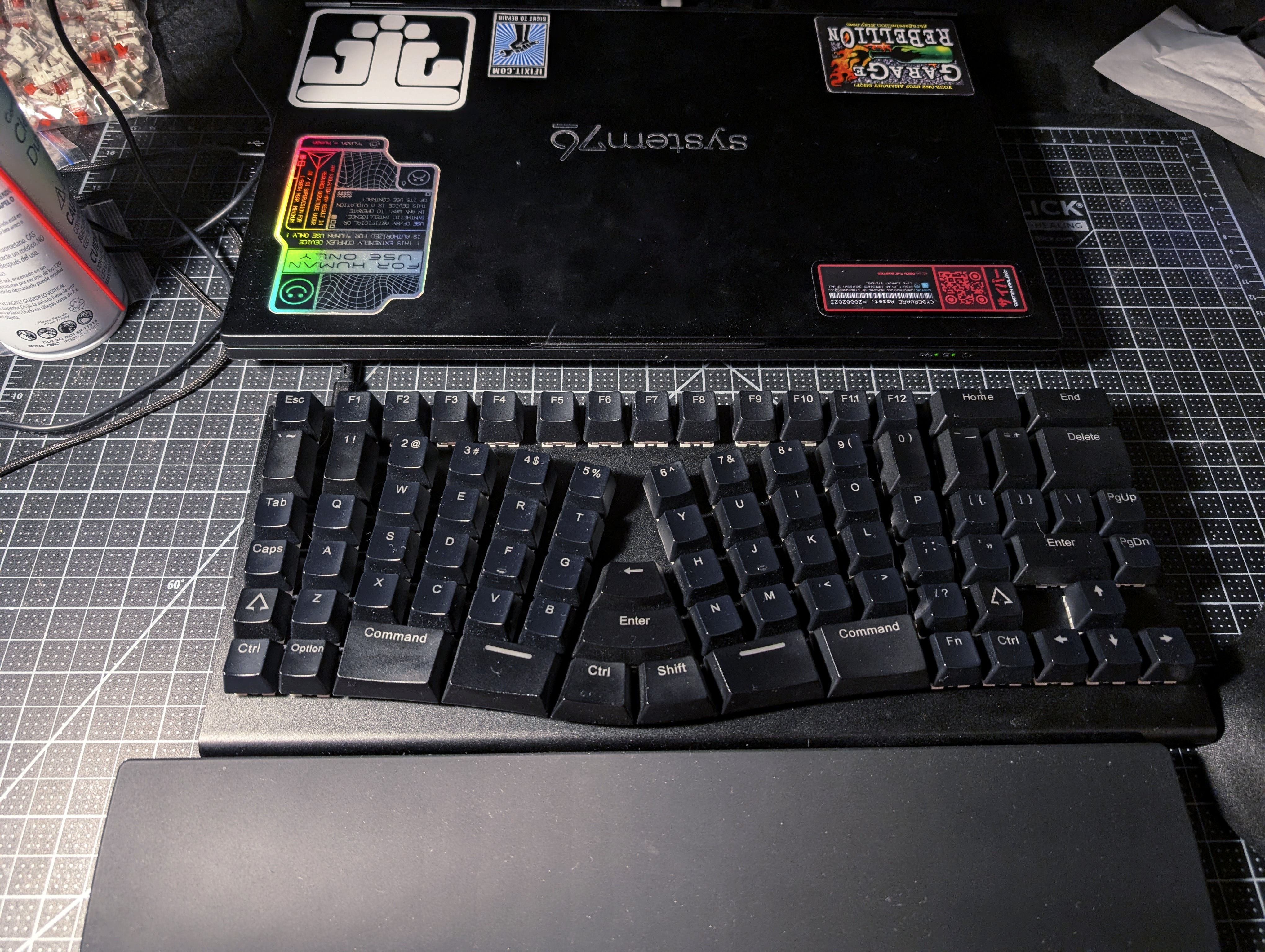
The XBows Knight Plus that I am typing this on right now is quite possibly the best single purchase I have ever made in my entire life, hands down. In this review I'll catalog the things I like about it, the things that could be improved but are generally fine, and the things that I don't like about it.
Disclosure
I did pick up my XBows Knight on eBay for $75, instead of its full ~$300 MSRP, so that may be biasing my opinions with regard to whether it's worth it, but I really don't think so – while many of the XBows's features aren't particularly unique in themselves, they're extremely unique in this combination, and especially with so much thought put in them. Furthermore, I've recommended they keyboard to other friends who've spent the full price, and they have absolutely zero regrets.
What I like
- The size
-
As someone with large hands, I find the cramped design of most keyboards – especially keyboards in the DIY split ergonomic mechanical keyboard space, which tend to trend even smaller in the name of "economy of motion" or space savings – actively painful, since I tend to have to scrunch my hands up in ways that are far from relaxed and natural in order to place my fingers on the keys and generally have my motions fit the keyboard. This was especially true in my experience with the Iris. Meanwhile, thanks to design features that I'll talk about in a moment, the XBows feels like a comfortable, luxurious, expansive experience. I can let my hands rest and dance languidly around the keyboard without having to tense and scrunch up at all, it feels like going from a twin size bed to a queen size bed.
- The per-column splay
-
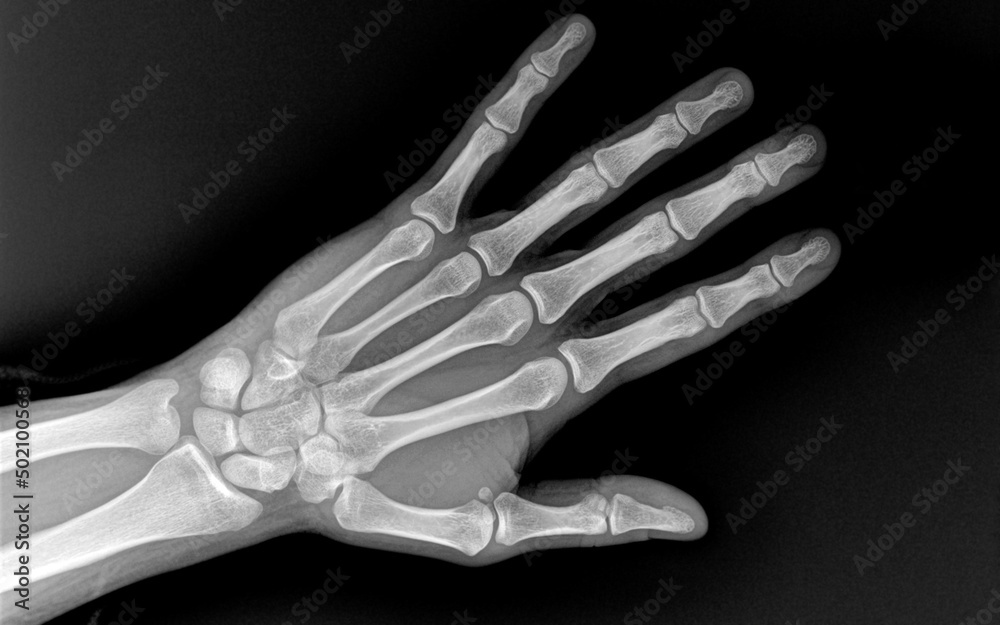
Column-splay – the rotating of key columns, on column-staggered keyboards, out from each other in a sort of fanning arrangement out from where your palms will rest – is rare to see even in the most niche DIY ergonomic split mechanical keyboard. This is deeply unfortunate, in my opinion, because when I close my fists and then spread my fingers out in the most comfortable and natural-feeling way, that doesn't result in my fingers making a perfect up-and-down motion from my palm, but in them splaying out from my palm at a natural angle. And this makes sense – if you look at how the fingers extend into the palm in a human skeleton, you'll see that they're naturally splayed, and keeping your fingers only going straight up and down would actually be keeping them bent in the middle. A per-column splay mirrors this, meaning the motions of my fingers can be more natural.
- The column-staggered keys
-
Columnar key layouts with different offsets for each column, to account for different finger lengths, are pretty standard on ergonomic keyboards these days, but that doesn't mean that this isn't a great aspect of the XBows. I used to use all sorts of improper fingering on traditional keyboards, reassigning keys between my fingers so that they could travel in straighter lines, because the row-staggered layout requiring my fingers to move along lines diagonal to my actual hands was deeply uncomfortable, but this was never a complete solution, as it either resulted in some fingers having V travel or being left with some diagonal motions, and in general was just a bit of a mess. The XBows resolves this completely. Now almost all finger motions I perform, except to reach certain symbol keys with my pinkies and the inner rows with my index fingers (which are pretty much unavoidable issues without fundamentally redesigning the keyboard or going low-key) are straight in and out from my palms in a natural way, just like opening and closing my fingers, and the top keys of each column are equally easy to reach for each finger!
- <<key sizes>>The adjusted key sizes
-
One of the other really great things the XBows does that I see zero other ergonomic mechanical split keyboards doing is adjusting key sizes to increase accessibility. For instance, thumb keys that are under the palms, where the thumb isn't particularly dexterous, are huuuge, which is very helpful, and the keys at the top of the pinky rows are all extra tall, making them much easier to reach.
- The split
-
This, of course, is probably one of the most striking aspects of the XBows. A unibody split design for a keyboard is not new or particularly revolutionary in itself, but it's still a complete game-changer for my experiences with a keyboard. Being able to keep my wrists and forearms in a nice, completely straight and natural line with each other, straight down from my shoulders, instead of having to rely on awkward, inconsistent, and generally unworkable when you want to type fast hacks to finger and hand positioning on traditional keyboards like I was used to doing, is just so great. It's essentially completely eliminated my recurring carpal tunnel symptoms, to the point where I can now type for 8 hours a day for weeks on end and really not notice a thing. It's just excellent.
Some might raise concerns with the fact that it's a "fixed split" – i.e., the two halves of the keys are separated and rotated at a fixed angle from each other on the same single board – but in my opinion this is not a serious problem. The blessed thing about triangles is that even if you fix the angle of one corner, you can adjust the angles of the other two (and thus the angle of your wrists from your forearms) by adjusting the length of the two sides coming out from the fixed angle (the length of your arms reaching from your shoulders to the keyboard, controlled by your distance from the keyboard). I think very few people have such narrow or wide shoulders that simply adjusting their distance from the keyboard won't fix 99% of whatever issue with the fixed angle they're having. Moreover, the fixed angle comes with a lot of benefits for me – it was really annoying trying to use the Iris and constantly having things knock it around out of wack, having a wire stretching between the two halves – Bluetooth is too unreliable for such a crucial HCI for me – blocking putting things between them, and then there's just the inherent fiddliness of trying to find the right position for the halves all the time, and always being tempted to meddle with it, not to mention the difficulties in travelling or using them with a laptop.
- The fused thumb cluster
-
The idea of a thumb cluster isn't new to the world of split ergonomic mechanical keyboards either. The idea is simple: for keys that you're going to be holding down a lot, like Ctrl, Meta, Shift, Super, etc, you want to put them under the strongest finger on your hand, the one that's most suited to performing such a task without undue strain, not the weakest one. Thus, we put all those things, in addition to the spacebar, under your thumbs, instead of under your pinky fingers like on a typical keyboard. This also has the delightful effect that key chords become gripping motions that are quite natural to humans as creatures with opposable thumbs. If I didn't already have pre-existing RSI, this might even make key-chording Emacs usable!
The XBows has some fun twists on this idea, too. For one thing, it uses the adjusted key sizes idea to great effect for thumb cluster keys, to make them a lot easier to reach and use than many thumb clusters. For another thing, thanks to its "fixed split" design, they keys in the middle of the cluster (Backspace, Enter, Ctrl, and Shift) can serve double duty, since either thumb/index finger can reach them easily enough, which is not something that can be said for fully split keyboards, which either have to do without duplicating available keys between thumbs – which has significant ergonomic drawbacks, since different thumbs will be easier to use for modifier keys given different combinations of other keys pressed, this is why even traditional keyboards usually duplicate all the modifiers – or have to use up their precious key space duplicating them at the cost of other options. By means of the fixed split idea, the XBows functionally has a 12-14 key thumb cluster, when the vast majority of fully split ergonomic keyboards can only afford 8 thumb keys at most!
- Plentiful keys
-
This is one of the key reasons why I chose the XBows over competing ergonomic split keyboard options. The XBows comes with a healthy compliment of 86 keys, full enough for all the symbol, number, letter, modifier, function, and navigation cluster, and arrow keys on one layer, including duplicates of all of the modifier keys, without any need to sweat out some kind of highly-optimized, crammed-in layout or deal with 36 invisible layers. The best part about this is that if you find you don't need some of these keys, you can just remap them to other things, and if you find that you prefer the layer approach to the plentiful keys approach, you can of course emulate that too.
- Layout designed for easy transitioning
-
Another great aspect of the XBows is that it's layout is explicitly designed to make it easy to transition back and forth from traditional keyboards with as little a loss in productivity as possible. This is primarily achieved by ensuring that all modifier keys, and keys like backspace, are in their typical positions as well as their more ergonomic positions on the thumb cluster. Thus, if you accidentally forget and try to use them, they'll be where you expect them. Eventually, if you decide you don't need them anymore, you can remap them to something useful (like maybe keyboard macros?), but this is a great onboarding device, and if you frequently have to use other keyboards, it can continue to be helpful for a long time as well.
- QMK firmware
-
I've mentioned layering and mapping keys and so on several times now, so I think it's time to cover this. The XBows allows you to flash it with the fully open source and extremely versatile and powerful QMK firmware, so that you can write arbitrary C code – with a very good framework around it – to design the behavior of your keyboard, lighting, and so on. It's great! I wish it wasn't so annoying in some ways (for instance, the build tools broke on my recently), but it allows you to do some really incredible things personalizing your Ono-Sendai. And if that isn't your speed, there's also an official version of the XBows firmware that supports Vial/Via, so that you can use a graphical user interface to customize your keyboard layout, layers, keyboard and lighting behavior, etc. Albeit in a less flexible way.
- Hot-swappable key switches
-
Continuing with this theme of the XBows being shockingly hackable, it has hot-swappable Cherry MX (or Gateron Optical) switch sockets, meaning that you can buy whatever switches you want from anywhere on the market (or even kitbash your own custom switches, as I do, with my TX 75g springs in my Halo Trues) and use those, instead of just the selection they offer.
- Unibody aluminum design
-
This thing is built to last. You can still relatively easily open it up for repairs if you need to, it's just two normal screws on one end, but you probably won't need to repair it anytime soon, because the hide protecting the delicate circuitry inside is four pounds of aluminum machined from a single block. You could bash in a person's skull with this thing and then sit back down to type again.
- Modular
-
There are magnetized mounting rails and 8 data pins on either side of this keyboard for attaching extra modules. The company only officially provides a numpad that you can use with these mounting points – which, as a result, you can put on either side! – but combine these data pins with the fact that you can flash arbitrary firmware and they use a known and fairly common processor chip inside this keyboard, and there's a lot of potential here for additional hackability.
- No Bluetooth
-
No connection issues. No delays. No battery to run out and eventually expand and die and need to be replaced. 'Nuff said.
- Detachable cable
- This is just a nice little extra detail, but it's good to call out.
What's missing / what could be improved
- Tenting
-
From an ergonomic perspective, the biggest thing missing from this keyboard is tenting. Tenting would address the final axis of wrist ergonomics and really make this keyboard perfect. Of course, arbitrary tenting angles aren't possible with a fixed split keyboard, but a well-designed fixed tenting angle, like those found on the Kenesis Advantage and even Microsoft ergonomic keyboards, wouldn't go amiss – even a small tenting angle could go a long way. Honestly, I don't know why they haven't done this already, considering the apparent attention to detail in every other aspect.
- Innermost column splay
- One of the really nice touches on this keyboard is that the pinky finger column on both sides is actually splayed inward toward the rest of the hand just a tiny, tiny amount, instead of being splayed outward. This conforms nicely to the natural angle and movement of the pinky, and is a beautifully considerate move. I wish they would've done something similar for the innermost column of keys by removing the splay entirely, aligning that column completely with the other index finger column, since the index finger does double duty both managing the column it naturally lands on if you're following proper typing form, and those innermost keys, so that column doesn't need its own splay, since it doesn't get its own finger, and in fact it getting its own splay only makes the index finger reach more.
What I don't like
- Distance to some symbols
- Due to how much space the combination of splay, split, and central thumb cluster takes up compared to the letter/number keys of a traditional keyboard, the peripheral keys on the keyboard need to be pushed out substantially to make room. This means that the bracket keys are a little bit further than they'd ordinarily be, and the backslash/pipe key is waaaaay further – like, truly out there. It's honestly difficult to reach it with any kind of reasonable accuracy.
Conclusion
In all, while this keyboard does ultimately make some tradeoffs to achieve its goals, and as a result is certainly not perfect, or for everyone, I do find it to be the perfect hacker's keyboard, at least for me:
- The completely programmable, totally free and open source, flashable firmware, hot swappable switches, and modularity mean there's a massive amount of potential for hacking the keyboard itself, almost on par with most DIY keyboards – once they're built, at least – although it loses points in that department for its design not being open source, of course.
- It's also ergonomic, which is important to hackers, who spend long periods of time typing, and its approach to those ergonomics is generally extremely thoughtful and makes really insightful tradeoffs,
- It values your time and productivity by trying to provide an easy stepping stone between traditional keyboards and full use of the XBows, meaning you don't have to experience as long and difficult of a trough in your productivity to use it, and makes it easier to remain able to lean over someone's shoulder and type on their keyboard (an important tradition of the original hackers at the MIT AI Lab)
- It has all of the symbols (important for programmers, especially polyglots), letters, numbers, function keys (useful for Emacs Keyboard Macros) easily accessible without annoying and obstructive context switches to use them.
- It's sturdy in a way DIY ergonomic mechanical keyboards aren't: it will last an extremely long time and take a shit-ton of punishment, so you can feel free to throw it in your laptop back and take it everywhere you go, pull it out in any situation to interface with any Hosaka, which is exactly what you want out of the highest throughput means by which you communicate with cyberspace.